zoom_in
DTF Cleaning Solution for Epson Printheads | Daily Maintenance Fluid
- Reference: MTP-CleanSol-1L

€24.00 Tax excluded
Description
DTF printheads become clogged after each session. Without daily maintenance, water-based ink residues gradually block Epson nozzles and reduce the quality of your DTF transfers.
The Manutech-Print DTF Cleaning Solution provides a simple answer to this problem. Its premium formula supports daily printhead maintenance with fast and effective application.
Used every day, it removes DTF ink residues, keeps Epson printheads moist and extends their service life. This quick routine protects an investment worth several hundred euros.
Why use a DTF cleaning solution every day?
DTF inks are water-based pigment inks. They can dry and form deposits on printhead components when the printer remains idle.
These deposits cause white lines, uneven colours or blocked nozzles. Daily maintenance with a suitable cleaning solution limits these problems before they become irreversible.
Applications of the DTF Cleaning Solution
Versatile and compatible with all DTF printers on the market, this DTF cleaning solution covers daily and preventive maintenance needs.
- Daily and preventive maintenance of DTF printheads
- Flushing solution after each print session
- Cleaning of the wiper, damper and cap-top
- Keeps Epson nozzles moist between two sessions
- Compatible with DTF inks
- Universal, suitable for all DTF printers on the market

How to use the DTF Cleaning Solution?
Daily maintenance at the end of a session:
Pour a few millilitres of cleaning solution into the cap-top of your DTF printer. Then run the automatic cleaning cycle. This keeps the nozzles moist and limits blockages overnight or during the weekend.
Manual cleaning of the Epson I3200 or 4720 printhead:
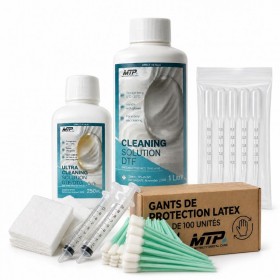
Apply the cleaning solution with a cleaning swab or DTF wipe. Gently clean the printhead surface to remove visible ink residues.
Internal printhead flushing:
Use a 20 ml Luer Lock syringe to flush the inside of the printhead. This method injects the solution directly into the ink channels.
How often should you use the DTF cleaning solution?
Use the cleaning solution at the end of each print session, ideally every day. Pour a few millilitres into the cap-top before switching off the printer. This quick routine prevents most nozzle blockage problems.
Is the DTF cleaning solution suitable for all DTF printers?
Yes, this cleaning solution suits printers equipped with Epson I3200, Epson 4720 and compatible printheads. It works with A3 DTF printers and large-format roll-to-roll machines.
What is the difference between Cleaning Solution and Extreme Cleaning Solution DTF?
The DTF cleaning solution supports daily preventive maintenance. The Extreme cleaning solution handles curative cleaning when the printhead already shows visible defects, such as lines or missing colours.
How long does a 1 litre bottle of DTF cleaning solution last?
On an A3 DTF printer, a 1 litre bottle lasts around 4 to 6 weeks with daily use. For several machines or intensive production, the 5 litre can offers a more economical format.
Can DTF cleaning solution damage Epson printheads?
No, its formula suits Epson printhead components. It contains no aggressive solvents and can be used every day on nozzles, the wiper or the damper.