zoom_in
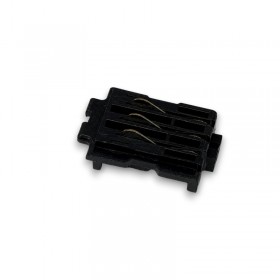
Brother GTX / GTX PRO Wiper Cleaner - Set x2
- Reference: SB6673001

€24.00 Tax excluded
Description
Make beautiful t-shirt prints with the Brother GTX Pro digital textile printer. Replace the wiper cleaner for GTX Pro regularly. Sold in a set of 2, these products are replacement parts for your Brother GTX Pro printer for your direct-to-garment printing needs.
Features of Wiper Cleaner for Brother GTX Pro / GTX
The set of 2 wiper cleaners for GTX / GTX Pro (reference: SB6673001). It's guarantees optimal cleaning of Brother GTX Pro print heads. It has the following characteristics:
Compatibility: Brother GTX and GTX Pro printers.
Quantity: Sold in packs of 2 to ensure a prolonged life of your Brother DTG equipment.
Brother reference: SB6673001.
Key advantages of the wiper cleaner for the GTX Pro printer.
Using the wiper cleaner for GTX Pro offers many advantages:
Optimal performance: Keep your Brother DTG printheads clean, ensuring premium textile customisations.
Durability: Extend the life of your GTX series DTG printer by preventing the build-up of ink residue.
Easy to use: Quick and easy replacement, allowing you to minimise downtime.
Use and preventive maintenance of your Brother GTX series.
To keep your Brother GTX Pro digital textile printer in perfect condition, it is necessary to regularly replace the wiper cleaner. Over here are a few tips :
Replacement: Follow the instructions provided by Brother DTG for capable and efficient replacement.
Frequency: Adapt the replacement frequency according to your print volume for optimal results.
For optimal prints and a Brother GTX Pro digital textile printer in perfect condition, replace the GTX Pro wiper cleaner. If in doubt, the printer notifies you to replace the Brother DTG spare part.
Order now on Manutech Print and benefit from our expertise to optimise your textile personalisation performance.
How to use the Wiper cleaner for Brother GTX / GTX Pro?
- Press “Menu/OK” on the screen to display the menu.
- With the Arrow key go down then select “Maintenance”,
- Confirm by pressing “OK”.
- Choose “Cleaning/Replacing the maintenance part” and confirm “OK”.
- Follow the on-screen message and turn off the Brother GTX series printer.
- Replace both wiper cleaners if necessary.
- You have 30 minutes to complete cleaning the printer before you need to turn it back on.
With the cleaning swab moistened with our CSX cleaning solution for Brother DTG, clean the surface of the wiper as well as the space between the convex part and the wiper.
Repeat this cleaning once a week. This routine will keep your Brother GTX Pro digital textile printer in perfect condition. It guarantees constant and optimal textile printing quality. Remember, periodic maintenance represents the key to maximising the performance of your Brother DTG printer.